
 EN
 UK
 RU
 AR
 BN
 ZH
 DE
 ES
 FR
 HI
 ID
 UR
 PT
 TR
Most new media buyers treat proxies as a checkbox: buy something cheap, paste it into the antidetect browser, launch. Then an ad account dies on day two, a landing page loads in the wrong language, or a competitor's funnel shows a boring "white page" instead of the offer everyone is running. The proxy is rarely blamed, but it is often the cause.
Below are the mistakes we see most often from people starting out in affiliate marketing, arbitrage and ad research, and what to do instead. None of them need an expensive setup. They need the right proxy type in the right place.
1. Using one IP for several ad accounts
Platforms like Facebook, TikTok and Google link accounts by more than cookies. If five ad accounts log in from the same IP, the platform sees one person with five accounts, and when one gets restricted the rest often follow in a chain ban.
Fix: one account, one IP, one browser profile. For accounts you log in to every day, a dedicated IP that never changes is the safest base. A static ISP proxy gives you exactly that: an address registered to a real internet provider, assigned only to you, that stays the same for the whole plan.
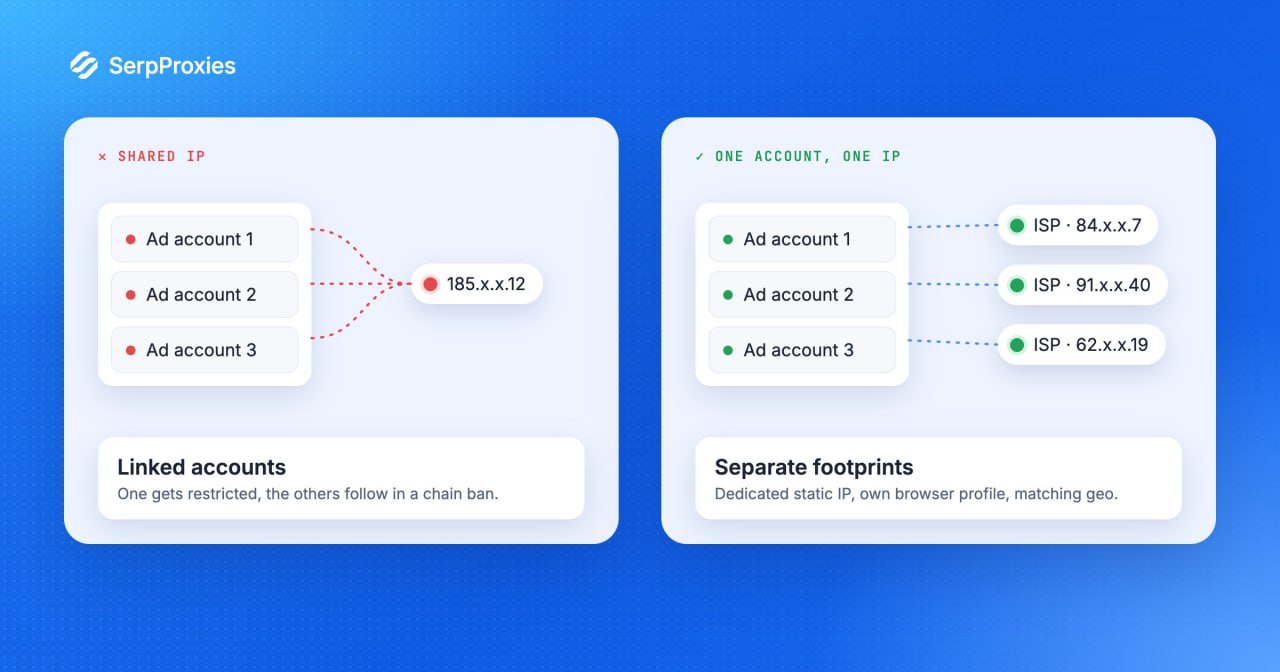
One account, one IP: shared IPs link ad accounts; dedicated static IPs keep them separate.
2. Picking the proxy type by price alone
Datacenter proxies are cheap and fast, so beginners use them for everything. The problem is that social and ad platforms know which IP ranges belong to hosting companies. A fresh account created from a datacenter IP starts with low trust before you have done anything wrong.
A simple rule of thumb:
Account farming and daily account work: static ISP or mobile proxies.
Checking ads and landing pages in many geos: rotating residential or mobile.
Bulk scraping of public pages where trust doesn't matter: datacenter or IPv6.
3. Letting the IP rotate in the middle of a session
Rotating proxies give a new IP on every request. That's great for scraping and terrible for logging in to an account. To the platform, a user whose IP jumps between cities every few seconds looks exactly like a hijacked account, and it reacts with checkpoints, SMS verification or a ban.
Fix: use sticky sessions for anything with a login. With rotating residential or mobile pools you can usually hold the same IP for a set time by adding a session ID to the username. Use a different session ID for every profile so two accounts never share an IP by accident. For accounts you keep for weeks, skip rotation completely and use static IPs.
4. Geo mismatch between the IP and the browser profile
The proxy says Germany. The browser time zone says Kyiv, the language is Russian, and WebRTC leaks your real IP. Every one of these signals is visible to the site, and a mismatch is one of the most common reasons a "clean" setup still gets flagged.
Fix: before you launch a profile, line these up:
IP country and, if possible, city match the account's location.
Time zone and browser language follow the IP (most antidetect browsers can set this automatically from the proxy).
WebRTC is set to use the proxy IP, not your real one.
DNS requests go through the proxy as well.
Most antidetect browsers (Dolphin Anty, AdsPower, GoLogin and others) have a proxy field in every profile, so lining this up takes a few minutes.
5. Not checking the IP before using it
A proxy can connect fine and still be a bad IP. It might already be on spam blacklists, carry a high fraud score from previous users, or show up as a different country than the one you paid for. Beginners find out only after the account is gone.
Fix: spend 30 seconds checking every new IP: location, ISP, whether it is flagged as a proxy or VPN, and whether it's on blacklists. You can do this with a free proxy checker before you attach the IP to a profile. If the fraud score is high, swap the IP before it touches an account, not after.
6. Spying on competitors from your own IP
This one matters a lot for anyone using an ad spy tool. You find a strong creative in Spy.House, click through to the landing page and get a neutral blog article or a "coming soon" page. The funnel isn't broken. Many campaigns show their real offer only to visitors from the target geo, on a residential or mobile connection, often on a phone. Your office IP in another country gets the safe version.
Fix: look at funnels the way the target audience does. Note the creative's geo and device in Spy.House, then open the landing page through a residential or mobile proxy from that country, with a matching mobile user agent if the ad ran on mobile. City-level targeting helps for offers that are local (dating, nutra, finance). The same approach is used for ad verification: checking what users in a given location actually see.
A practical workflow:
Filter creatives in Spy.House by geo, network and date to find what's scaling right now.
Save the landing URLs of the most interesting ones.
Open each through a proxy from the same country (mobile for mobile traffic).
Save the pre-lander, the offer page and the redirect chain, so you can study the funnel structure and not only the creative.
This turns a list of ads into a full picture of how a competitor's funnel works, which is where most of the learning is.
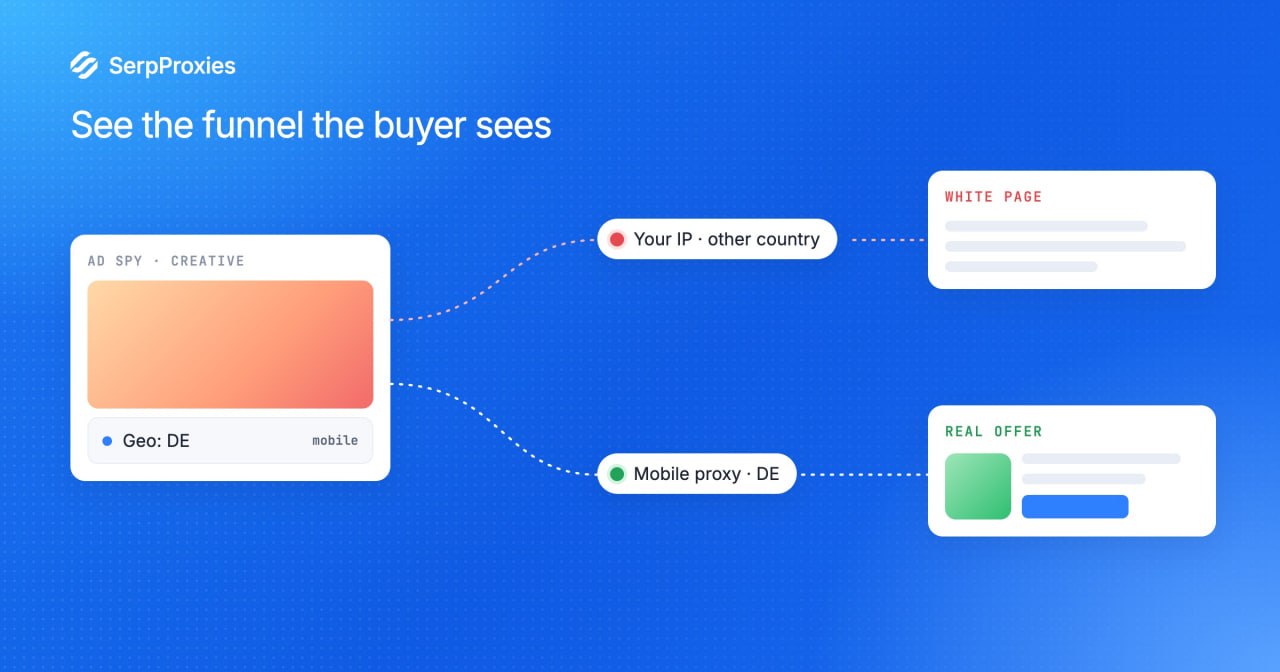
Open a competitor funnel from the target geo to see the real offer, not the white page.
7. Buying cheap shared pools for account work
Very cheap proxies are usually cheap because many people use the same IPs at the same time. If someone else in the pool spammed a platform yesterday, your account inherits that history today. Platforms also ban whole subnets, so one bad neighbour can take your IPs down with theirs.
Fix: for scraping or one-off checks, shared rotating pools are fine. For accounts that hold your ad spend, pay a bit more for IPs that are used only by you. A clean dedicated IP costs a few dollars a month; a banned ad account with spend history costs far more.
8. Burning bandwidth on the wrong traffic
Residential and mobile proxies are usually billed per gigabyte. Beginners load full landing pages with autoplay video, images and trackers through a per-GB plan dozens of times a day, then wonder where the traffic went.
Fix:
For page checks, block video and heavy media in the browser when you only need the text and the redirect chain.
Use per-GB residential traffic for the requests that need a residential IP, and route bulk work (like scraping thousands of public pages) through cheaper datacenter or IPv6 proxies.
For accounts that are online all day, a static IP with unlimited bandwidth is often cheaper than a per-GB plan.
9. Mixing everything in one place
When the same proxy list is used for account farming, scraping and competitor research, you lose track of which IP touched which account. When something gets banned, you can't tell why.
Fix: keep a simple table: profile name, account, proxy type, IP or session ID, geo, date added. Separate proxies by task. It sounds boring, but it is the fastest way to find the real cause of a ban instead of guessing.
A simple starter setup
If you are just starting out and want something that works without overthinking it:
Ad and social accounts: one static ISP IP per account, matched to the account's country, in its own antidetect profile.
Competitor research and landing page checks: rotating mobile proxies or premium residential proxies with country and city targeting, paired with an ad spy tool like Spy.House to find what's worth checking.
Scraping and monitoring: datacenter or IPv6 proxies, kept separate from anything with a login.
SerpProxies has all of these on one account, with HTTP and SOCKS5 on every product and country, city and session control set directly in the proxy string. Spy.House readers get 20% off an order with the code SPYHOUSE20 at serpproxies.com.
Quick answers
How many accounts can I run on one proxy?
For ad accounts and social profiles, one. Sharing an IP is the easiest way for a platform to link accounts together. For scraping and research, one rotating pool can serve as many requests as you need.
Mobile or residential for checking landing pages?
If the campaign targets mobile traffic, use mobile proxies: some funnels check the carrier and show the real offer only to mobile users. For desktop campaigns, residential from the same country is usually enough.
Is a free proxy good enough to start with?
Not for anything with a login. Free proxies are shared by thousands of people, are often already blacklisted, and the owner can see your traffic. They are fine for a quick look at a public page and nothing else.
Final thoughts
Most proxy problems in affiliate marketing aren't technical failures. They come from using the right tool for the wrong job: rotation where you need stability, a datacenter IP where you need trust, or your own IP where you need to see what a buyer in another country sees. Get those three right and a lot of "random" bans and "broken" funnels stop happening.




Comments 0